
This page will help you get started with Profile APIs.
Webex Connect has two types of profiles namely App Profile and Customer Profile.
When a customer registers with your mobile/web app, an app profile is created automatically in our profile store which contains the userID and deviceID of the customer. It also contains certain other attributes like the push token, OS/browser of the device, etc. that are captured during user registration. Information stored in the app profile alone is sufficient to send push notifications and in-app messages. The attributes available as part of the app profile are pre-defined and cover all the key fields that you would need for maintaining application-specific profiles of your customers.
In addition to the app profile, Webex Connect offers a customer profile to help you store additional information such as customer ID, name, email, and phone number i.e. MSISDN, of your customers. Unlike the app profile which doesn't allow you to add any new attributes, the customer profile can be extended to store additional information such as date of birth, account balance, etc based on requirements. In case you are using the customer profile, linking the app profile of customers with their customer profile becomes important to fetch or update the customer-specific profile attributes that reside in the customer profile. And this can be done by calling the updateProfileData method available in the SDK.
Client Profile Key
A Client Profile Key is needed to invoke Webex Connect Profile APIs. This key is accessible on the Tenant Settings page within your Webex Connect tenant.
To obtain the Profile Key:
- Go to the user profile and click Tenant Settings.
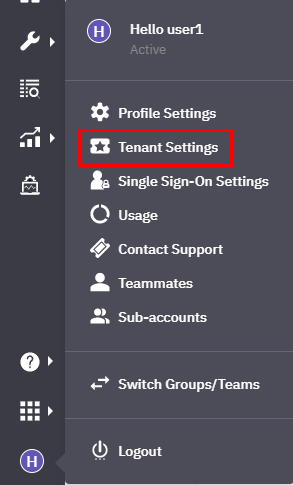
Screenshot Highlighting the Tenant Settings.
- View and copy the Profile Key using the icons available.
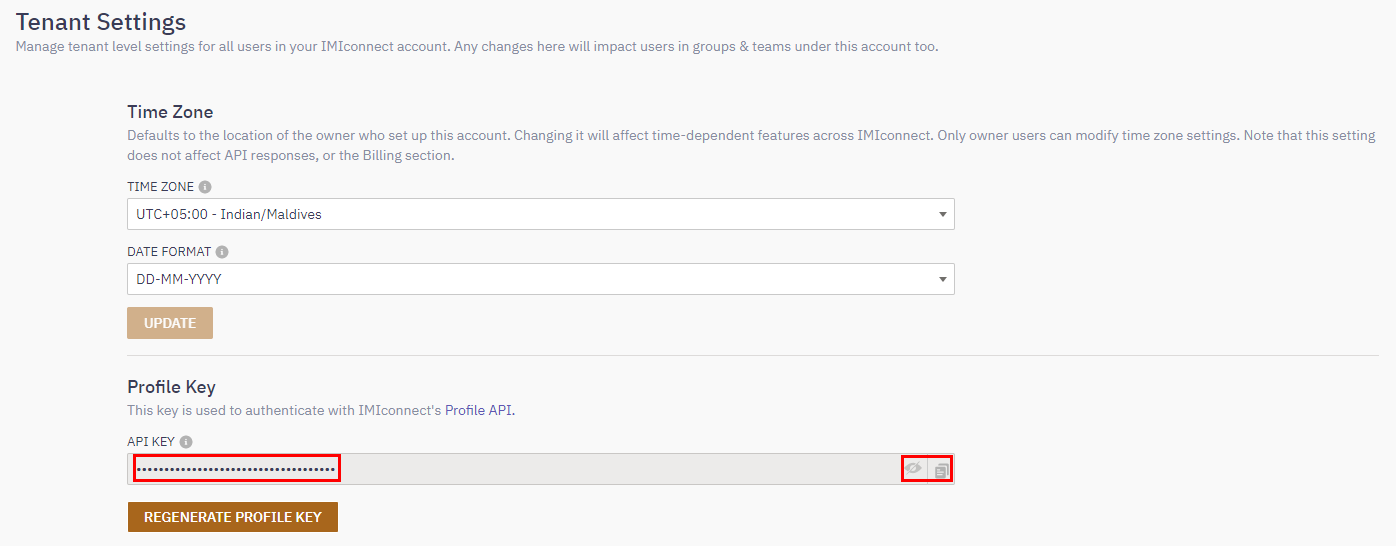
Profile key in Tenant Settings.
This is the Profile Key you need to use in your API calls.